
Prefer a shorter version? Open the public intro deck: Product deck (EN) · 产品演示 PPT (中文)
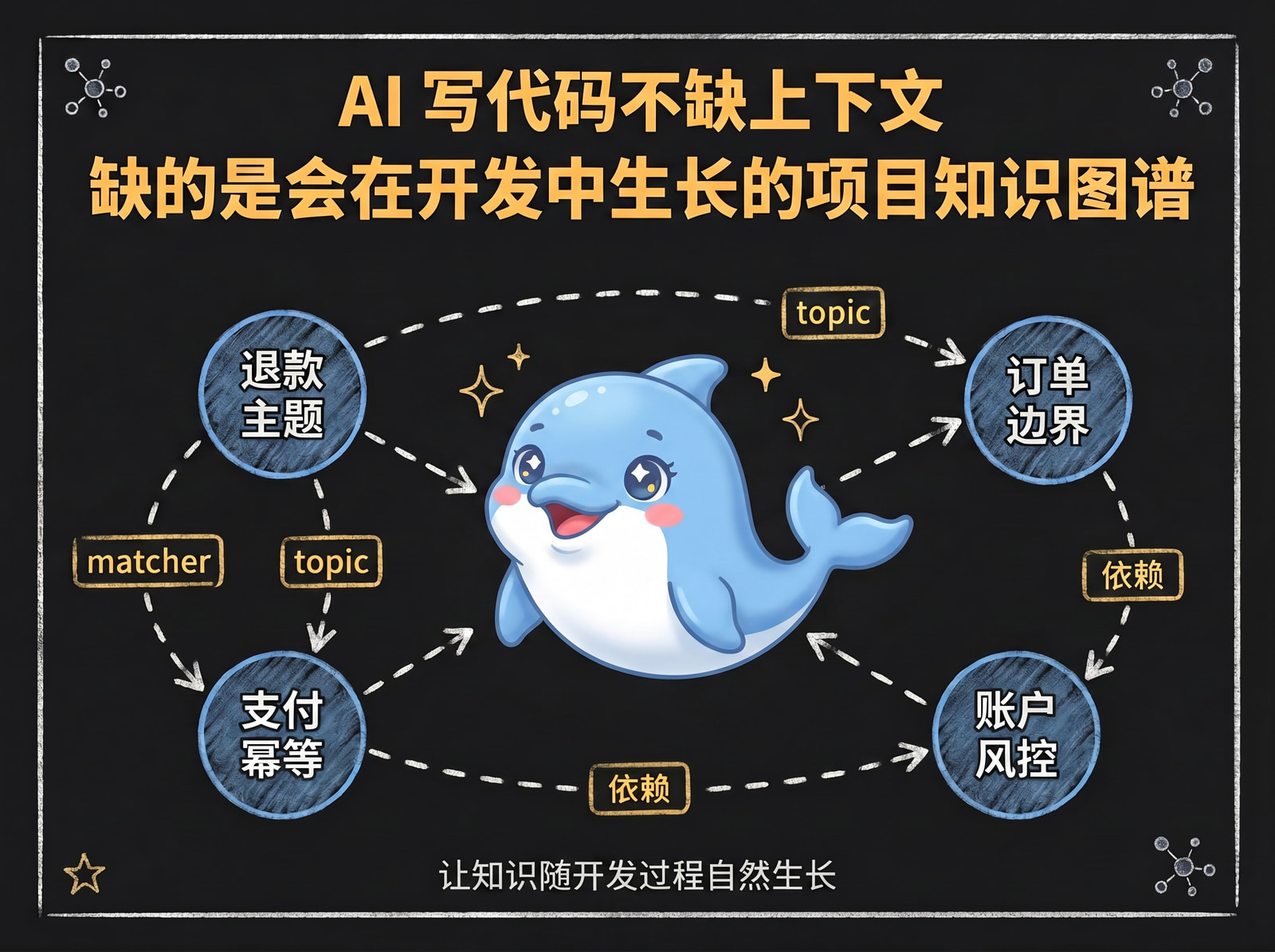
Flow2Spec: Let Projects Naturally Grow a Knowledge Graph During Development
I. Introduction
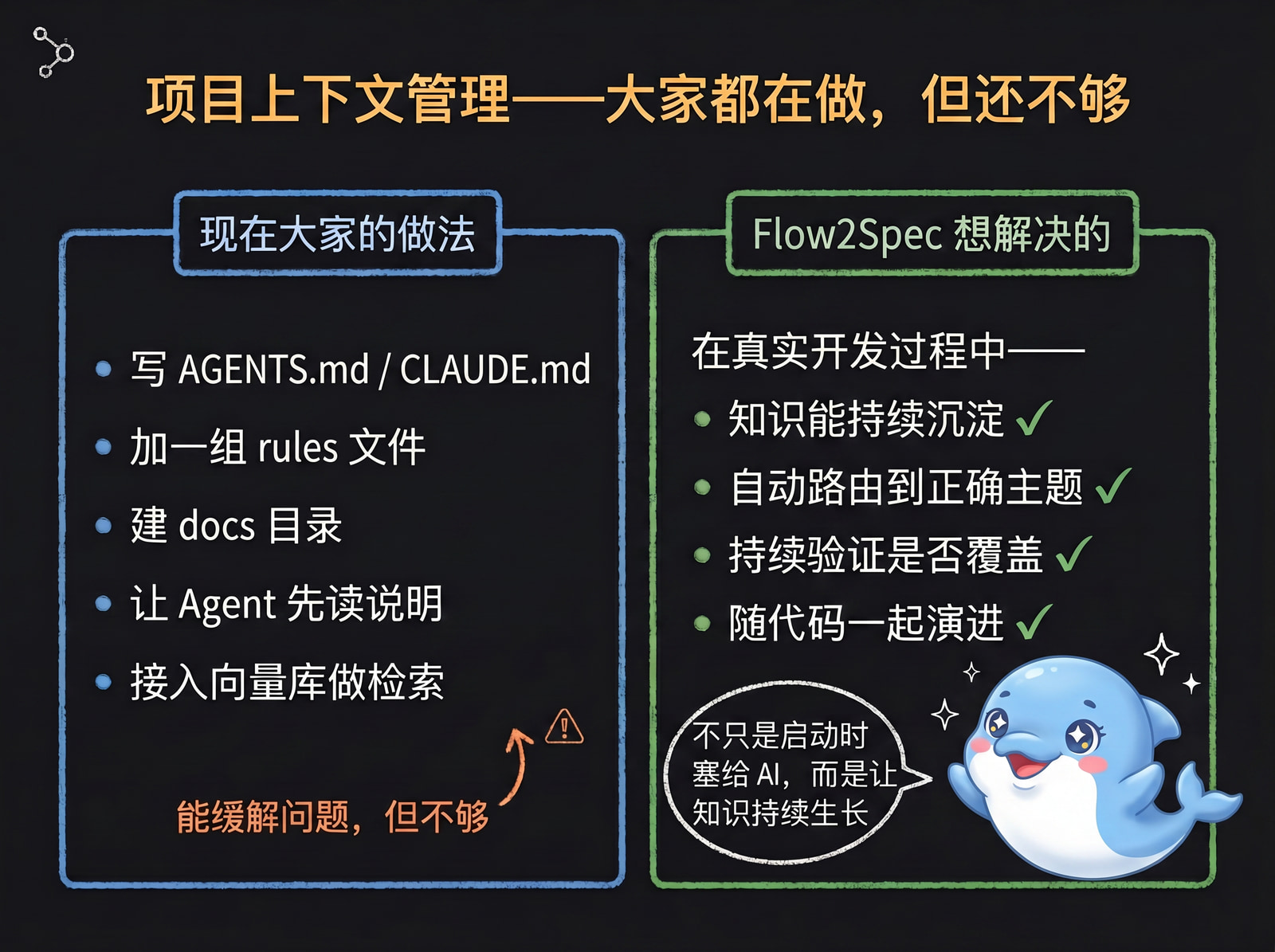
Over the past year, many AI coding tools have been solving the same problem: helping Agents remember project context.
That matters, of course. But talking about “project memory,” “context management,” and “rule files” alone is no longer enough.
Many open-source projects are already doing similar things: writing an AGENTS.md / CLAUDE.md, adding a set of rules, creating a docs directory, having the Agent read project documentation first, or wiring up a vector store for retrieval.
These approaches help, but what I really want to solve isn’t “stuffing a bunch of context into the AI at startup.” What I want to solve is:
Can project knowledge be continuously accumulated, automatically routed, continuously validated, and evolve alongside the code — throughout the actual development process?
That’s Flow2Spec. In one line: Flow2Spec is an Agent engineering framework that lets a project naturally grow a knowledge graph during development.
II. Why “Memory” Alone Isn’t Enough
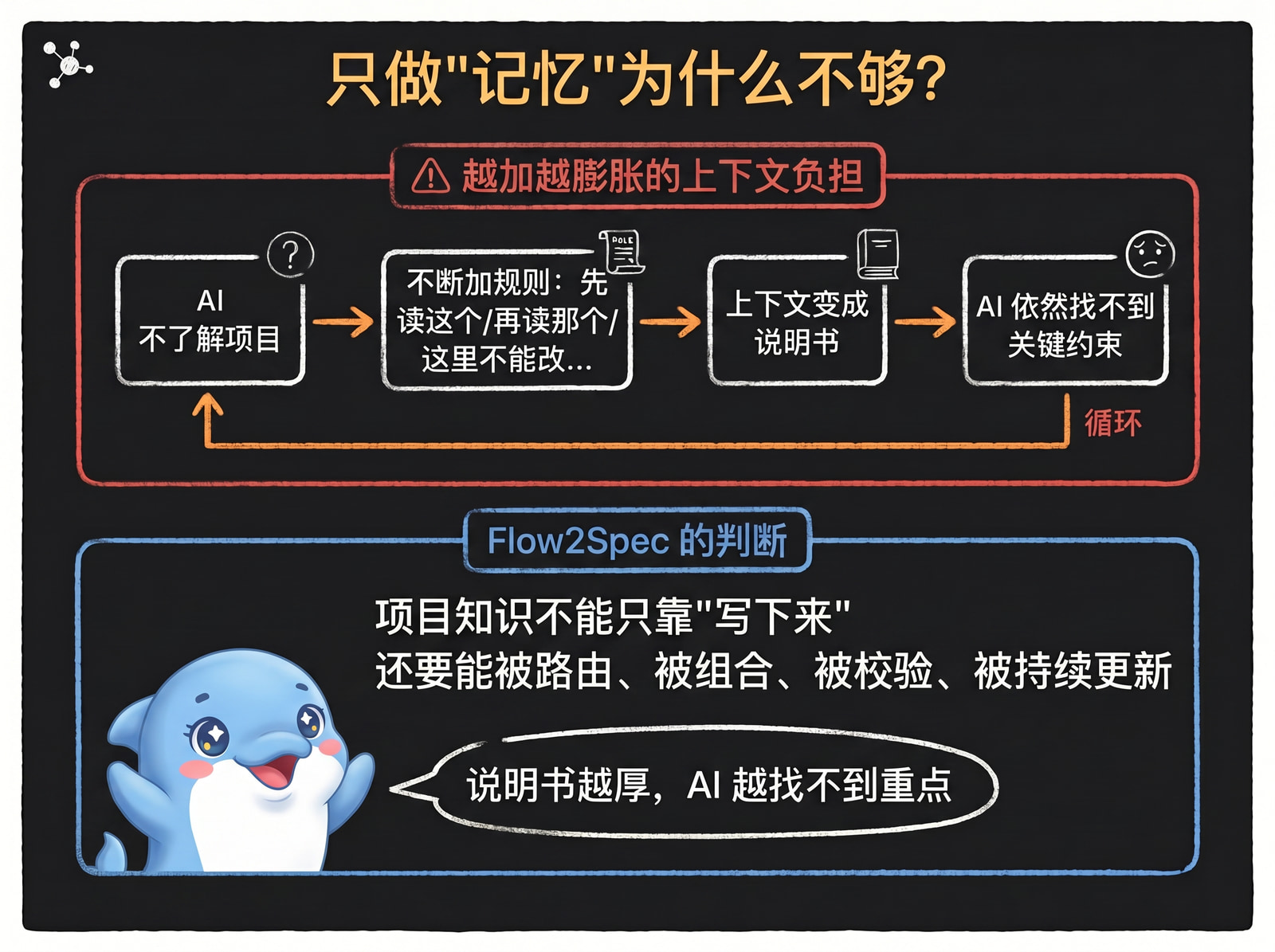
After projects integrate AI, they quickly run into a paradox: you want the AI to understand the project better, but the more context you give it, the more likely it is to miss things, go off track, or forget what matters.
So people keep adding rules: read this file first, then that directory, don’t touch this module, that interface has legacy compatibility, remember to update the docs after changes… Eventually the context becomes another burden. It looks like a knowledge base, but it’s really more like an ever-growing instruction manual.
Flow2Spec’s position is: project knowledge can’t just be “written down” — it needs to be routable, composable, verifiable, and continuously updated.
III. Flow2Spec’s Key Difference: A Knowledge Graph That Grows During Development
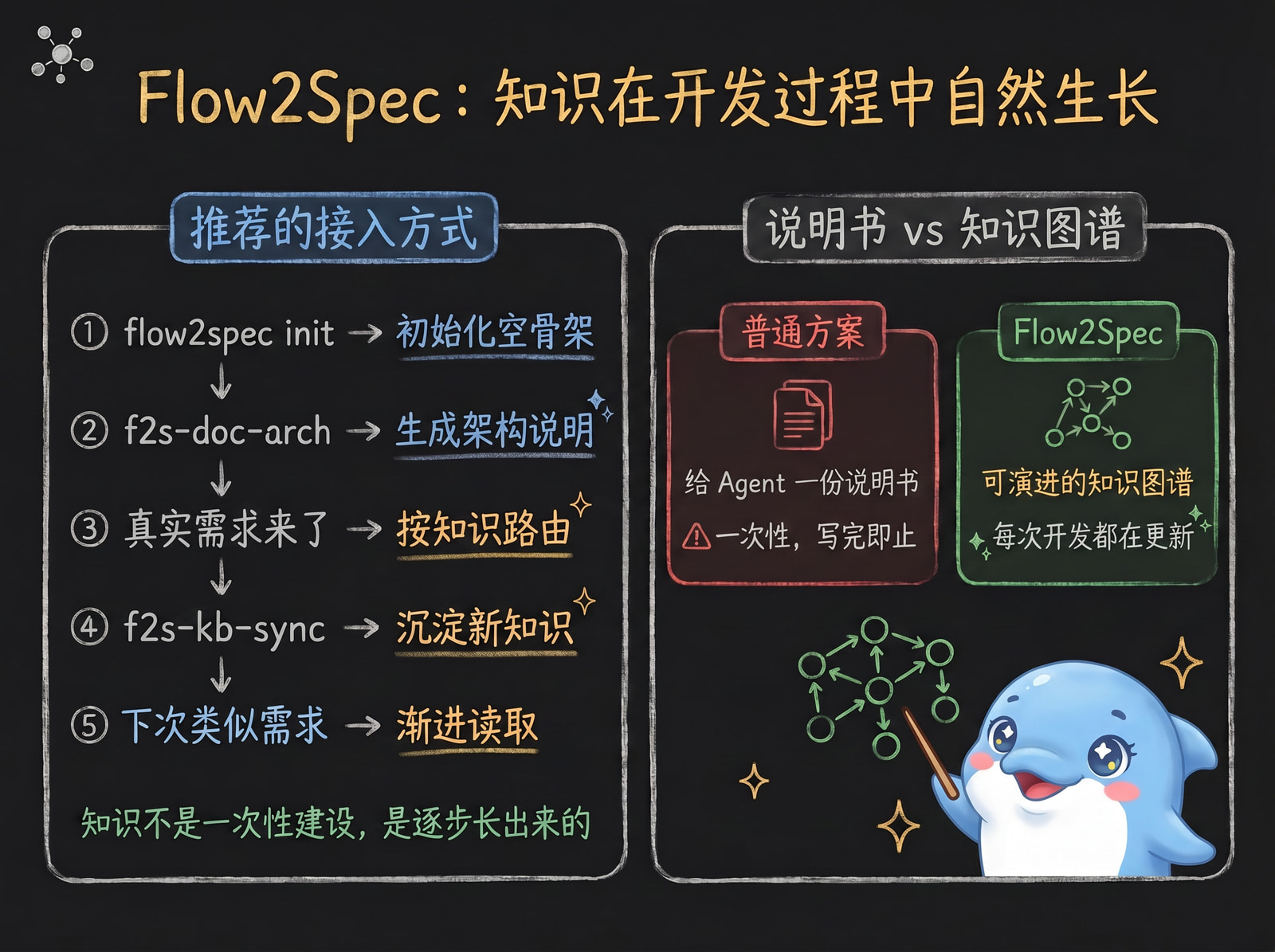
Flow2Spec doesn’t ask you to do a massive documentation effort upfront. The recommended approach is:
-
Run
flow2spec initto initialize an empty skeleton. -
Use
f2s-doc-archto generate an architecture overview and bring it into the knowledge base. -
When real requirements arrive, have the Agent route through existing knowledge first.
-
After a capability ships, use
f2s-kb-syncto sync confirmed facts back into the knowledge base. -
The next time a similar requirement comes up, draw from this knowledge incrementally.
Knowledge isn’t built all at once. It grows through requirements clarification, technical design, code implementation, bug fixing, knowledge sync, and committing code.
This is what sets Flow2Spec apart from ordinary “project memory files”: an ordinary solution hands the Agent a manual; Flow2Spec maintains an evolvable knowledge graph in the repository’s .Knowledge/ — diffable, reviewable, committed alongside code.
IV. The Knowledge Base Interface: Not a Pile of Docs, but a Routing Protocol
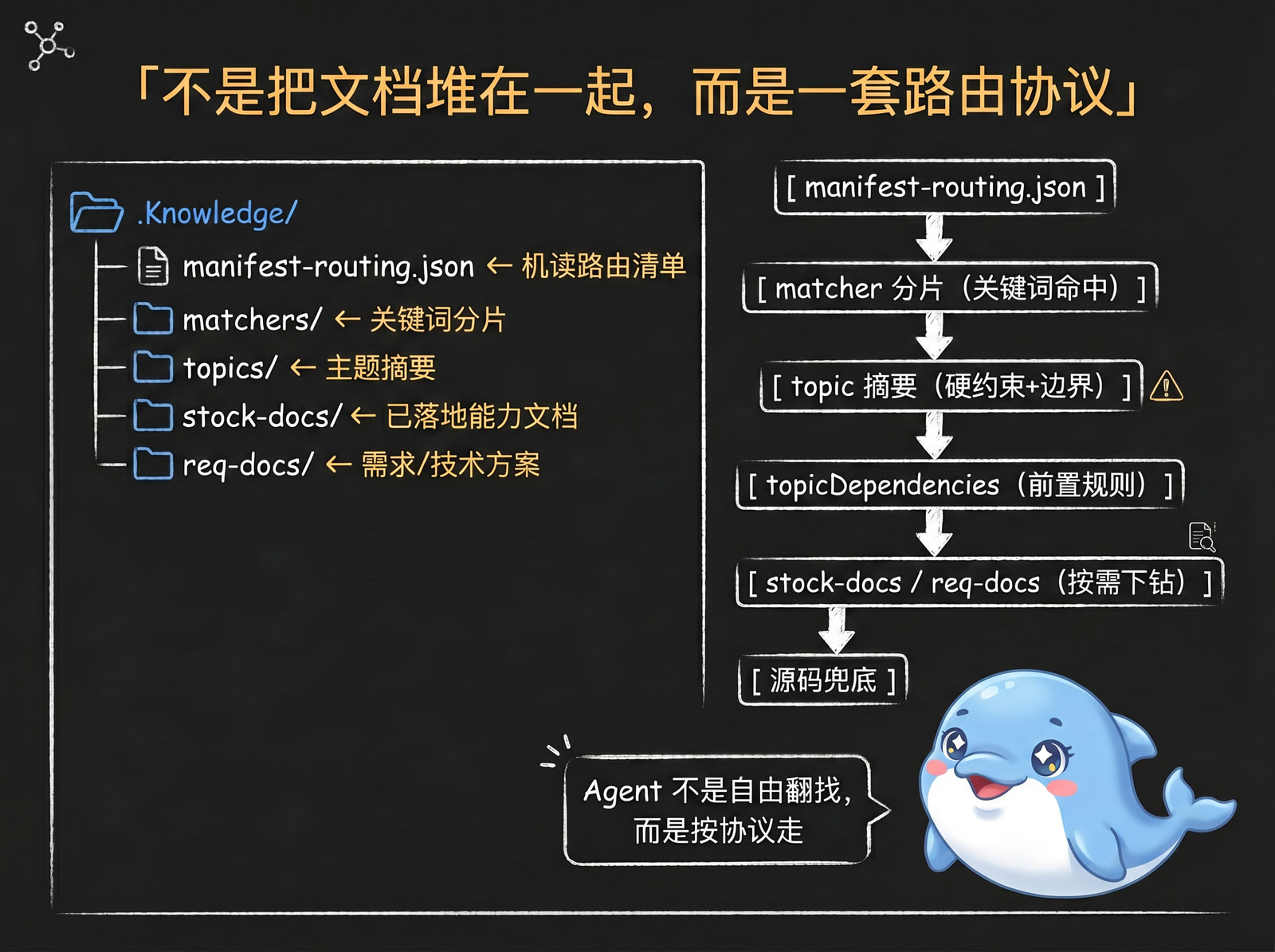
Flow2Spec’s knowledge base has a clear interface structure:
.Knowledge/
  manifest-routing.json   # Machine-readable routing manifest
  matchers/               # Keyword shards
  topics/                 # Topic summaries
  stock-docs/             # Long-form docs for shipped capabilities
  req-docs/               # Requirements / technical design docs
The Agent’s reading order isn’t free-form — it follows the protocol:
manifest-routing.json
  -> matcher shard (single file pointed to by matcherPath)
  -> match (primary candidate)
  -> expand (dependency topics first, then primary; keep secondary candidate)
  -> verify (gap check)
      -> sufficient: act
      -> insufficient: stock-docs / req-docs (on demand)
          -> still insufficient: fall back to source code
          -> act or clarify
Figure 1: Incremental Knowledge Retrieval
The value of this structure: the knowledge base doesn’t expose “files” to the Agent — it exposes an interface for “how to find the right knowledge.”
manifest-routing.json tells the Agent what topics exist; matchers/*.json tells the Agent which topics a requirement might match; topics/*.md gives short summaries and hard constraints; topicDependencies tells the Agent which prerequisite rules must be read together; stock-docs/ and req-docs/ are only drilled into when needed.
V. Incremental Retrieval: The Agent Only Takes What It Needs
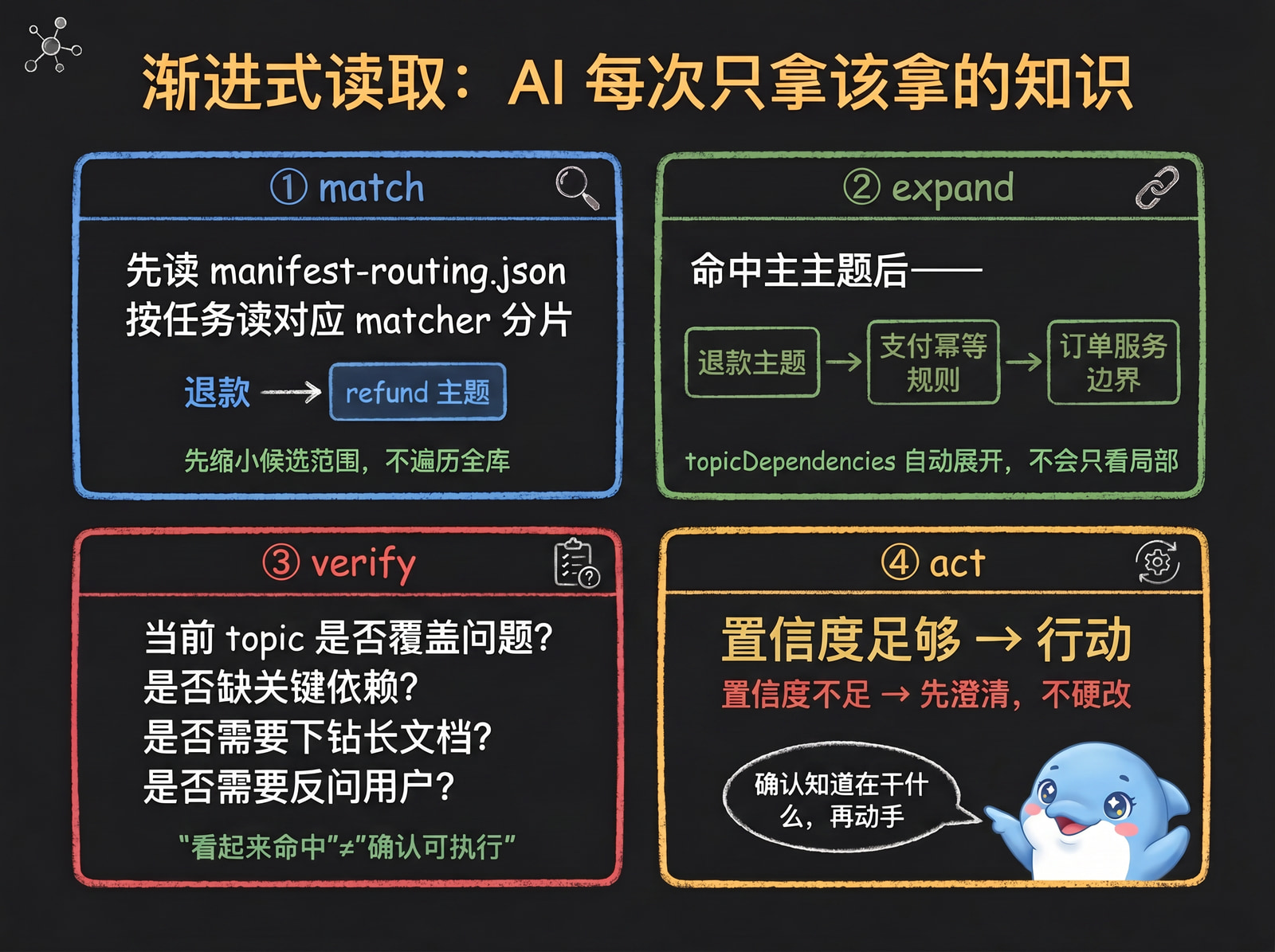
Flow2Spec’s retrieval model can be summarized in four steps: match → expand → verify → act
match: The Agent reads manifest-routing.json, then reads the corresponding matcher shard for the task. It doesn’t traverse the entire knowledge base — it narrows down candidates first.
expand: After hitting the primary topic, the Agent continues reading dependency topics via topicDependencies, avoiding partial rule coverage. For example, a feature might depend on common config rules, auth rules, and a specific business module’s constraints all at once.
verify: Hitting a topic doesn’t guarantee sufficient knowledge. Flow2Spec requires the Agent to check before acting: does the topic actually cover the user’s question, are key dependencies missing, is a long-form doc needed, should the user be asked first? This turns “looks like a match” into “confirmed ready to act.”
act: Only when knowledge coverage is sufficient and boundaries are clear does the Agent proceed to implement, modify, or commit. If confidence is low, it clarifies first — it doesn’t forge ahead.
VI. Multi-Dependency Capability: Don’t Let the Agent Read Only Half the Rules
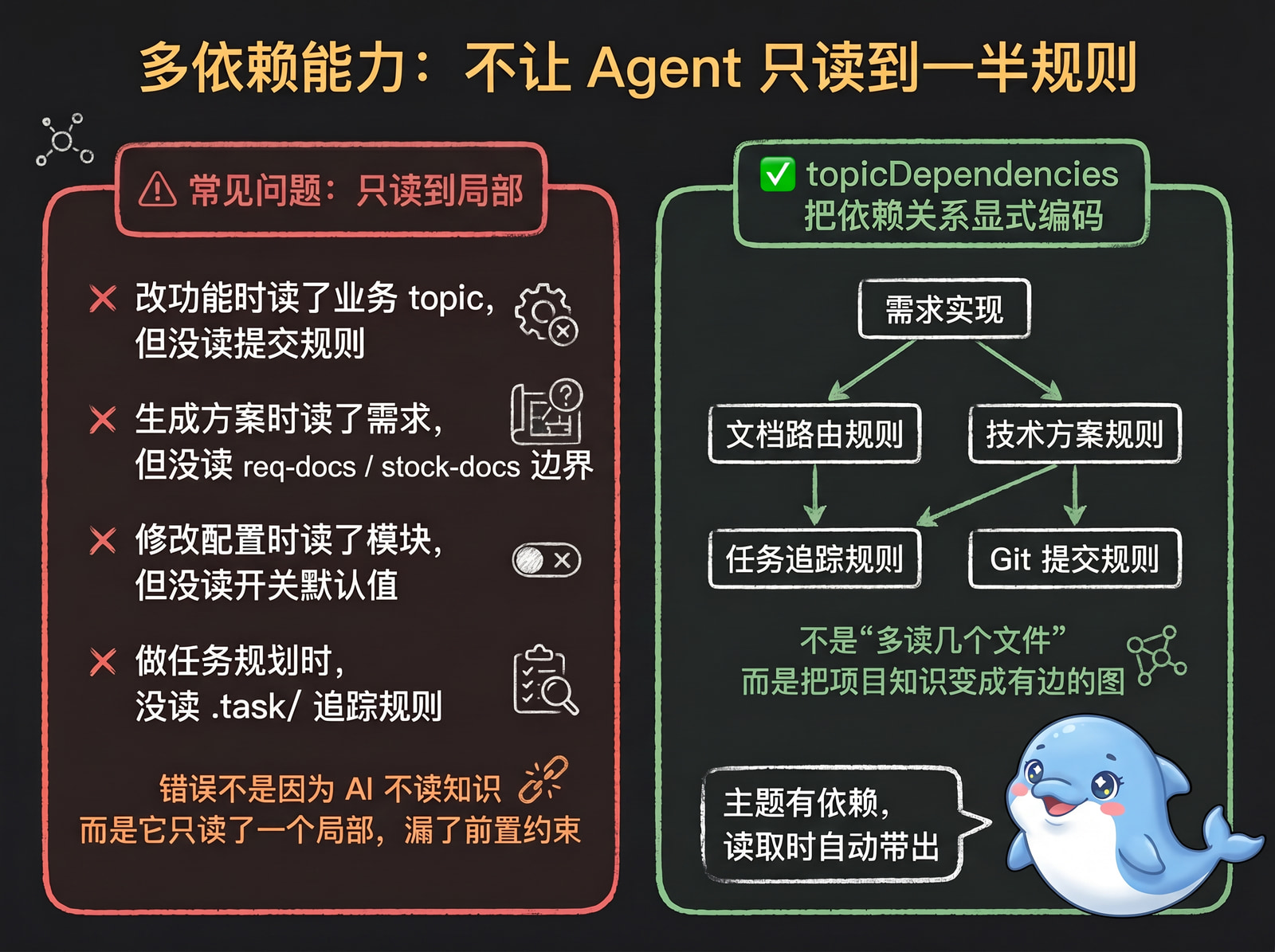
In real projects, many errors happen not because the AI didn’t read knowledge at all, but because it read only a local piece and missed a prerequisite constraint:
-
Changing a feature while reading the business topic, but missing commit rules
-
Generating a technical design while reading requirements, but missing req-docs / stock-docs boundary rules
-
Modifying config while reading the module description, but missing config switch defaults
Flow2Spec makes these dependencies explicit in the routing layer. A topic can declare which other topics it depends on; when the Agent hits a primary topic, it expands dependencies first. This isn’t just “read a few more files” — it transforms project knowledge from flat documents into a graph with edges:
Feature implementation
  -> Document routing rules
  -> Technical design rules
  -> Task tracking rules
  -> Git commit rules
This means every time the Agent reads, it gets a declared combination of context — not an isolated fragment.
VII. Knowledge Base Correctness: Writing a Topic Isn’t Enough
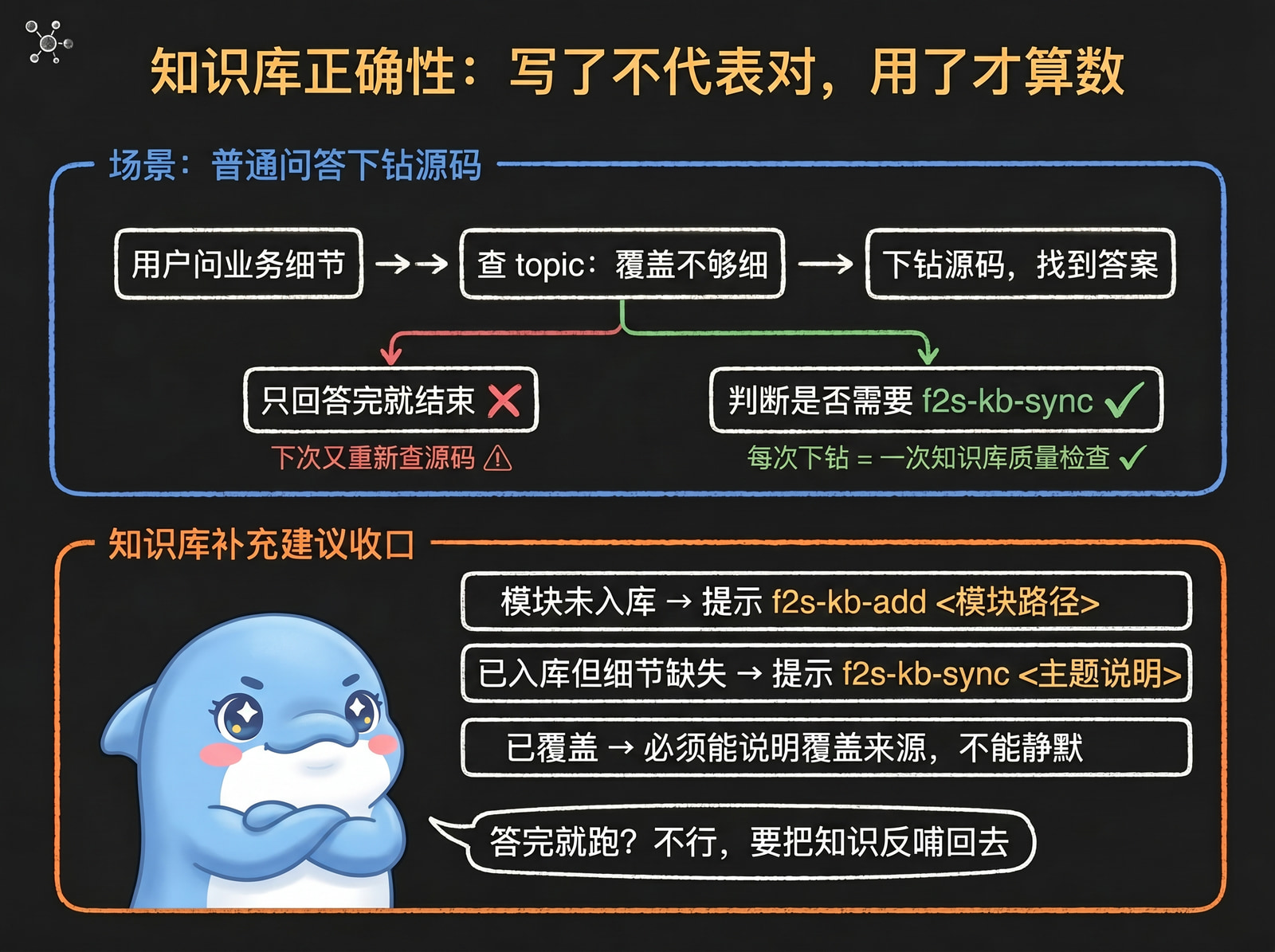
Two things kill a knowledge base: going stale, and being wrong. Flow2Spec doesn’t assume the knowledge base is always correct — it builds verification into the development process.
A typical scenario: the user asks a business detail; the Agent checks the knowledge base, finds topic coverage but not enough detail, then drills into source code for a more accurate fact. At this point Flow2Spec shouldn’t just answer and move on — it also needs to determine:
-
Has this fact already been written into the topic?
-
If not (or coverage isn’t detailed enough), should it suggest
f2s-kb-distillto extract this round’s Q&A into the knowledge base? -
If knowledge appears covered, can it prove the coverage source? If not, it can’t stay silent.
This is the “knowledge base feedback closing step.” It ensures new knowledge found in source code doesn’t just live in this one chat session — it feeds back into the knowledge base.
VIII. User Intent Recognition: Not Every Message Should Trigger a Workflow
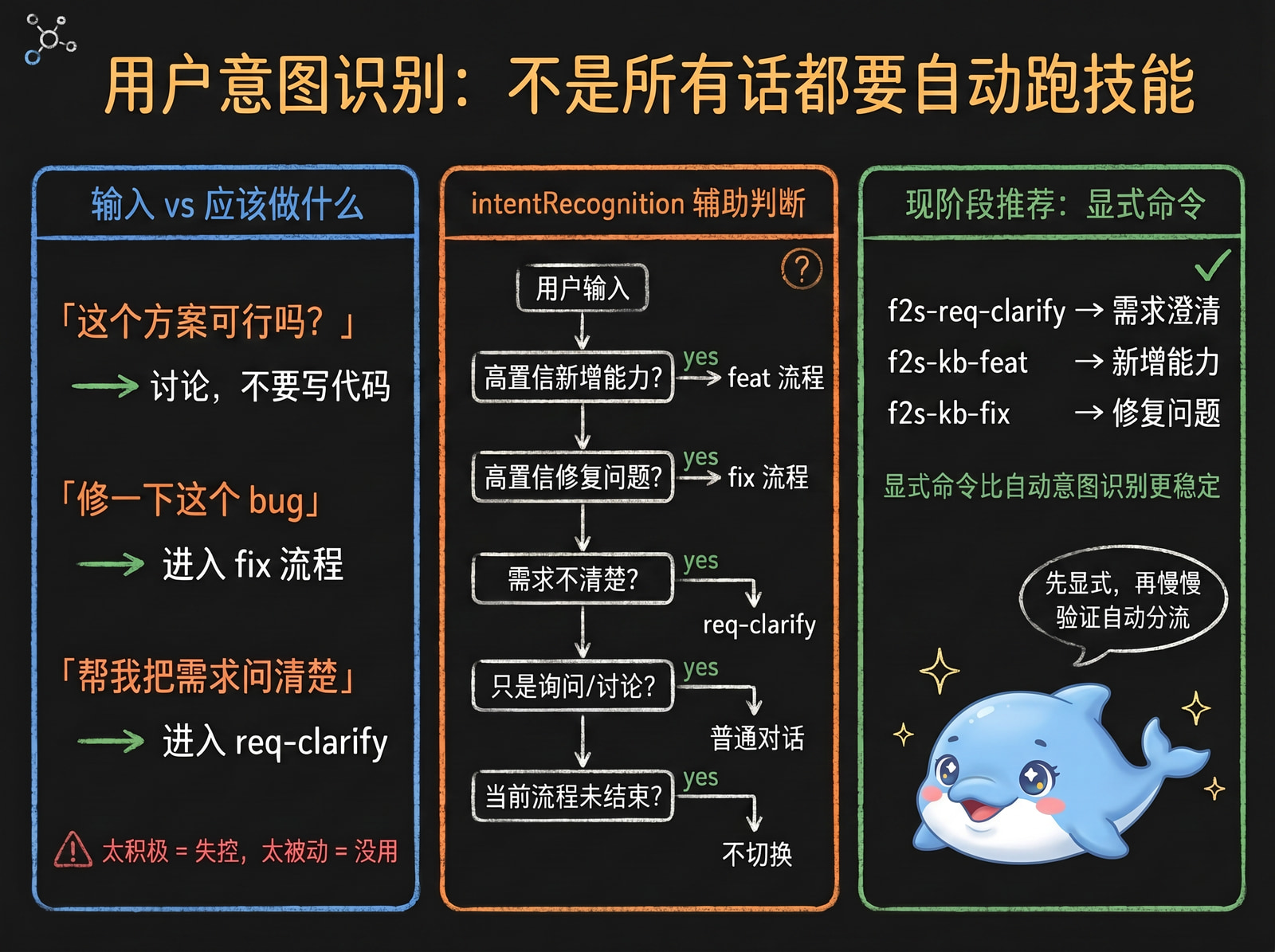
When the user says something, should the Agent answer, discuss, clarify, or jump straight into a development workflow?
-
“Is this approach feasible?” → discussion, not automatic coding
-
“Fix this bug” → enter the fix workflow
-
“I want a new capability — help me clarify requirements first” → enter requirements clarification, not immediate implementation
Flow2Spec has an intentRecognition switch. When enabled, the Agent uses intent recognition rules to assist routing: high-confidence new capability → feat workflow; high-confidence bug fix → fix workflow; unclear requirements → req-clarify; mere asking or discussing → stay in normal conversation.
After validation across real projects over time, intent recognition is now stable enough that we recommend enabling it by default, letting the Agent route automatically in most scenarios; you can still type f2s-req-clarify, f2s-kb-feat, f2s-kb-fix, etc. explicitly at any time to override the automatic decision. We also recommend using f2s-* skills explicitly more often — getting familiar with them is the most efficient way to use Flow2Spec.
IX. A More Realistic Development Loop
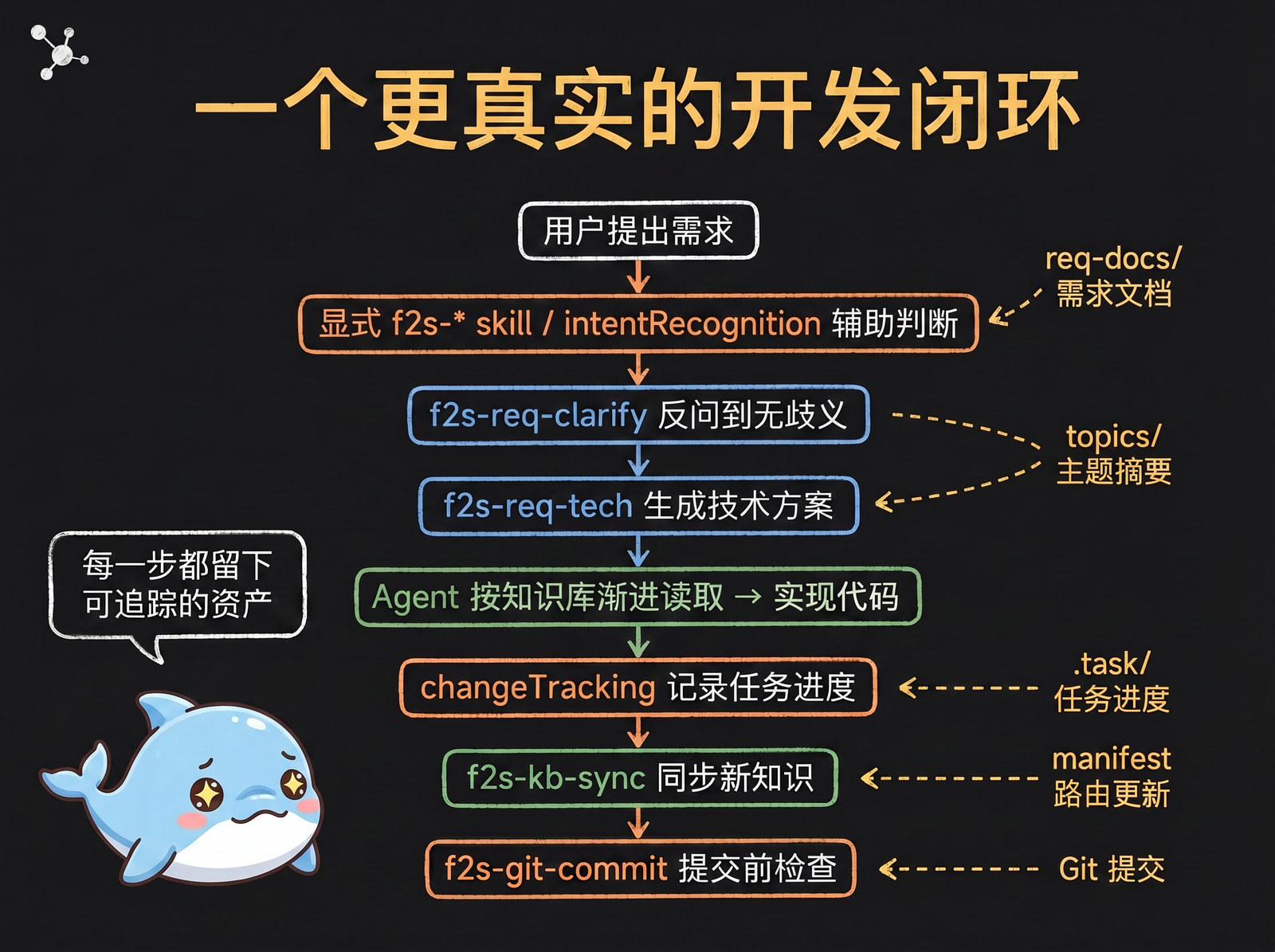
With Flow2Spec, a requirement might flow like this:
User submits requirement
  -> Explicit f2s-* skill / intentRecognition assists
  -> f2s-req-clarify clarifies until no ambiguity
  -> f2s-req-tech generates technical design
  -> Agent reads knowledge base incrementally
  -> Implements code
  -> changeTracking records task progress
  -> f2s-kb-sync syncs new knowledge
  -> f2s-git-commit pre-commit check
Figure 2: Knowledge Graph Growing Through Development
Every step in this chain leaves a trackable asset: requirements in req-docs/, shipped knowledge in stock-docs/, topic summaries in topics/, routing in manifest-routing.json, task progress in .task/.
Flow2Spec isn’t about making the AI answer better in a single session — it’s about turning each development process into an incremental update to the project’s knowledge graph.
X. It Manages More Than Knowledge — It Manages the Development Loop
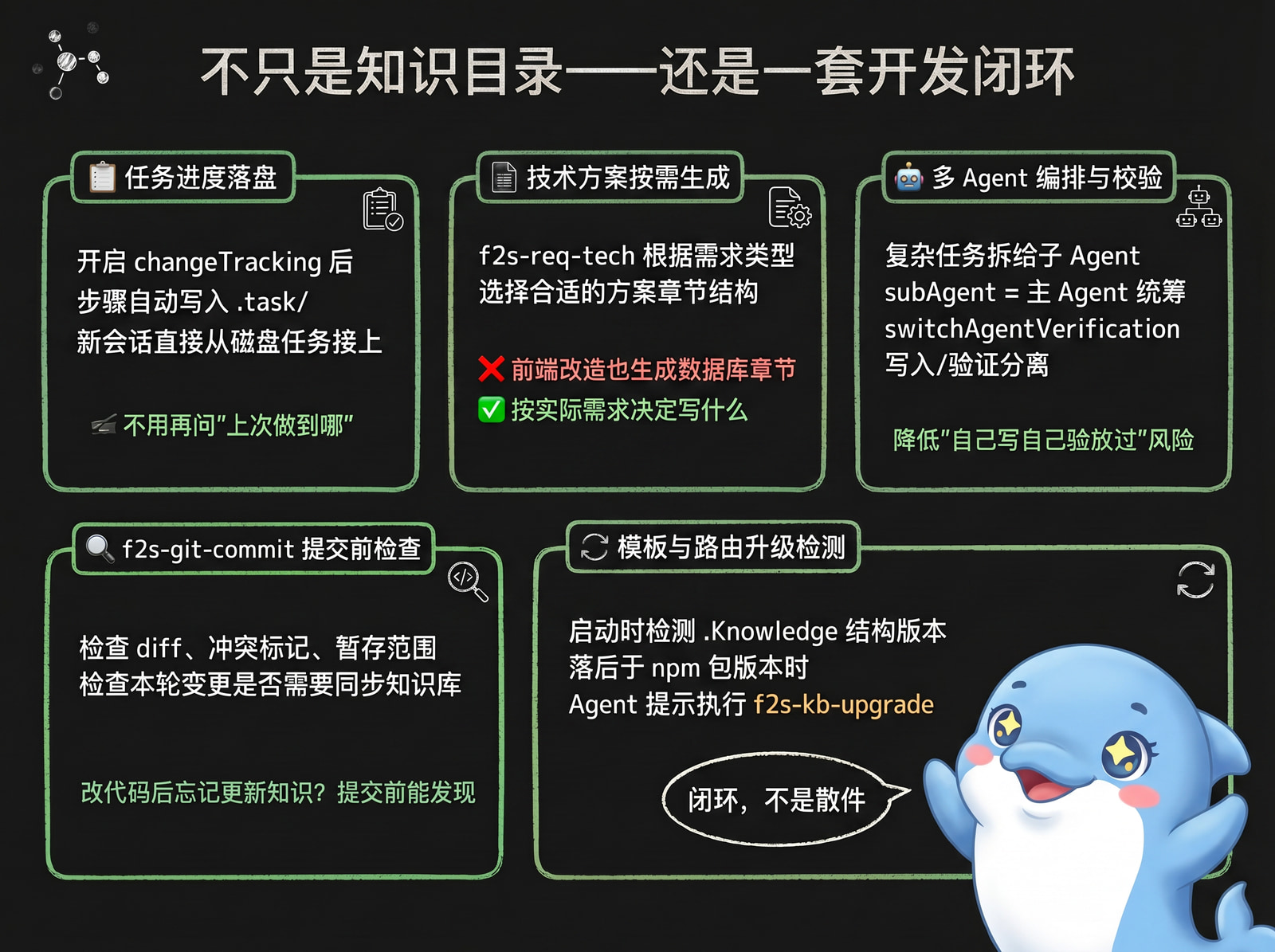
Task progress persistence: When changeTracking is enabled, the Agent writes a task checklist to .task/ during feature development or design implementation. New sessions resume from the on-disk task — no need to ask “where did we stop?”
Technical designs don’t follow a rigid template: f2s-req-tech selects structure based on the current requirement, rather than mechanically filling every section — so a frontend change doesn’t generate a template full of database chapters.
Multi-Agent orchestration and verification: Complex tasks can be split to sub-Agents via subAgent. When switchAgentVerification is enabled, writer and verifier are separated, reducing the risk of a single Agent writing, verifying, and approving its own work.
Pre-commit knowledge coverage check: f2s-git-commit checks the diff, conflict markers, and staging scope before committing, and checks whether the round’s changes require a knowledge base sync — catching “changed code, forgot to update knowledge” before the commit lands.
Template and routing upgrade detection: At startup, Flow2Spec checks Core Version and Template Version independently. Core-only updates refresh the runtime and Hook; when Template Version is behind, the Agent uses projectRev / pkgRev after init to decide whether f2s-kb-upgrade is required.
XI. Two Developers, One Knowledge Base
In team use, Flow2Spec does not merge every piece of Alice’s and Bob’s state. Each keeps a local task workspace; only confirmed knowledge enters the shared repository.
Figure 3: Tasks stay separate; knowledge converges
.task/ is ignored by Git by default and split into developer-specific TASK_ROOT directories. .Knowledge/ is shared. Skills express changes as structured deltas with the topic revisions they read; flow2spec kb plan checks those revisions before disk writes. Different topics can advance independently. When two people change the same topic, the second person pulls, rereads the latest meaning, and rewrites the delta.
This is not automatic text concatenation. It isolates state that should remain personal, keeps shared facts in Git, and stops where a semantic decision is needed. See Team Collaboration.
XII. The Biggest Difference from Ordinary Knowledge Bases
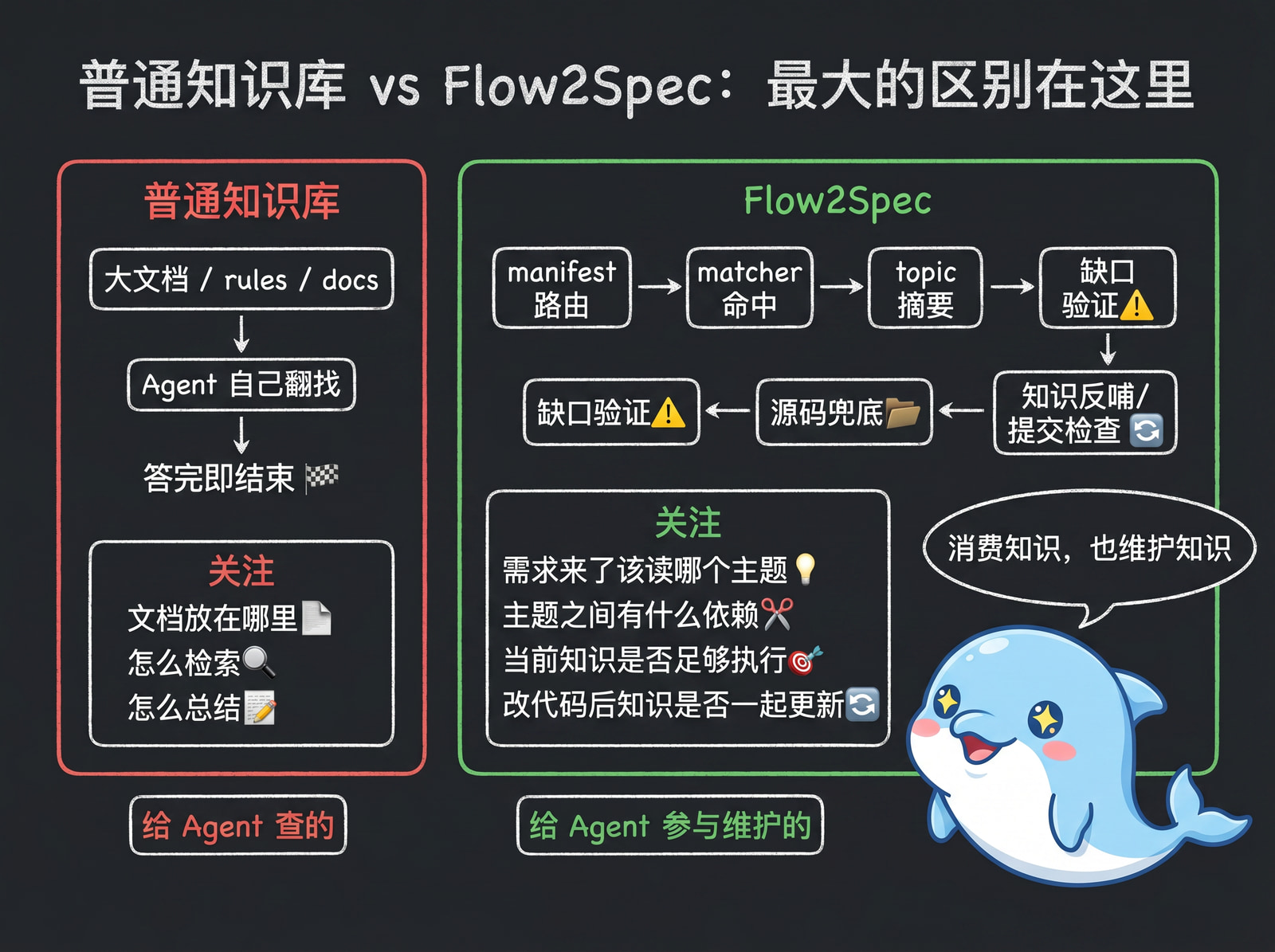
In one sentence: an ordinary knowledge base is something Agents query; Flow2Spec’s knowledge base is something Agents help maintain.
Figure 4: Ordinary Memory Files vs Flow2Spec Knowledge Graph
Ordinary knowledge bases focus on: where to put documents, how to retrieve them, how to summarize them.
Flow2Spec focuses more on: which topic to read when a requirement arrives, what dependencies exist between topics, whether current knowledge is sufficient to act, whether to feed knowledge back after a source code dive, whether user intent should trigger a workflow, whether knowledge gets updated alongside code changes, and whether knowledge coverage was checked before committing.
This is why Flow2Spec includes .Knowledge/, .task/, f2s-* skills, Agent rules, and flow2spec.config.json together — they aren’t separate pieces, but a protocol organized around the development loop.
XIII. Common Questions
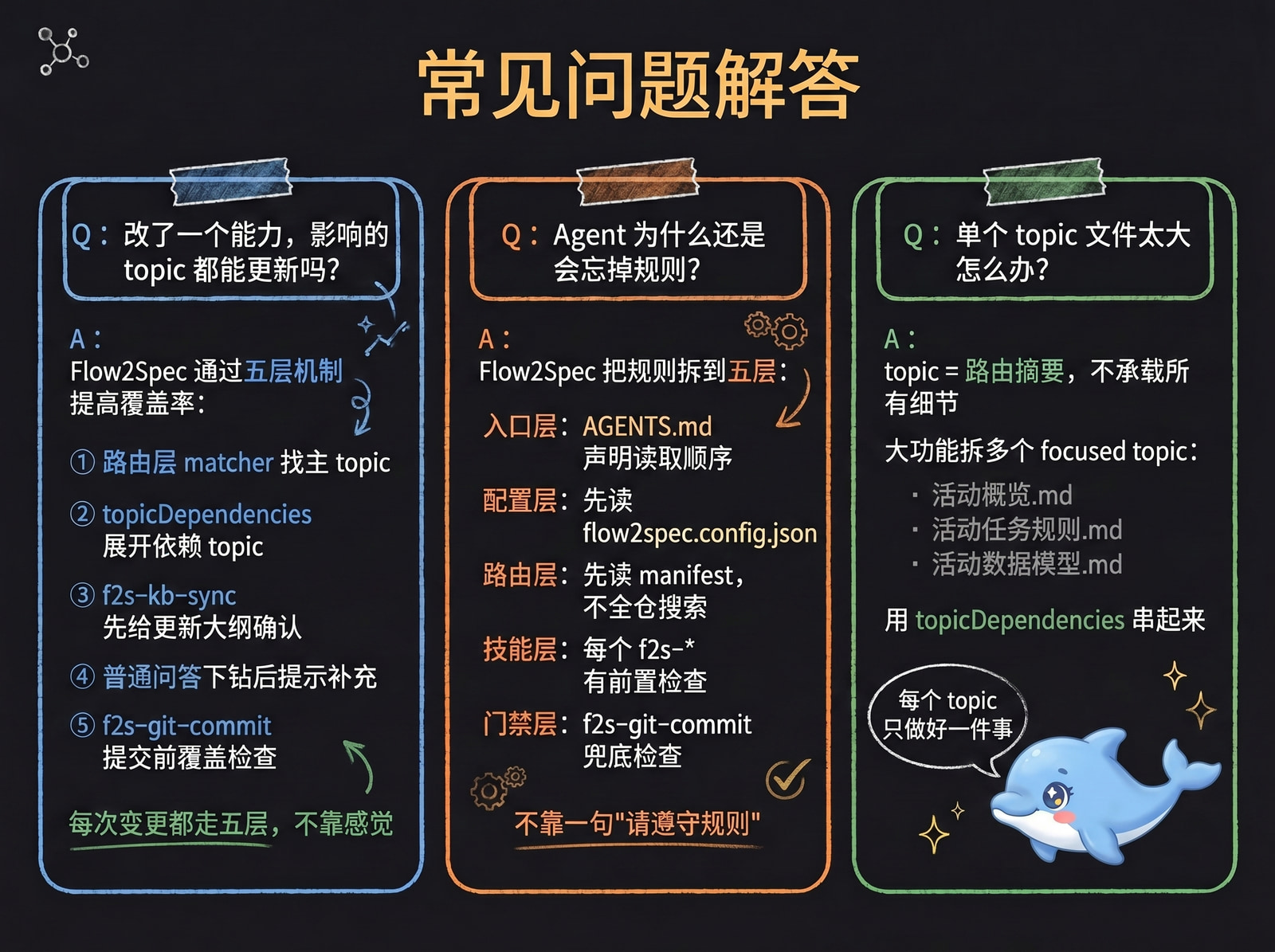
Q: After changing a capability, how do I make sure all related topics get updated?
Flow2Spec doesn’t promise “the model will automatically know all impact areas” — it turns impact discovery into an executable process.
A single capability change often affects more than one topic. For example, changing “batch rescoring” might affect:
| Type | What to check |
|---|---|
| Business capability topic | How this feature now works |
| Config topic | Whether switches, defaults, or thresholds changed |
| Rules topic | Whether idempotency, locking, error codes, or pre-commit checks changed |
| Module topic | Whether shared methods, directory boundaries, or call chains changed |
Flow2Spec raises coverage through five mechanisms:
- Routing layer: matcher finds the primary topic
- Dependency expansion:
topicDependenciesexpands dependency topics - Sync confirmation:
f2s-kb-syncoutputs an update outline for user confirmation - Q&A closing: after a source code drill-down in normal Q&A, prompts a supplement if gaps are found
- Commit gate:
f2s-git-commitchecks knowledge coverage before commit
Example: when changing the “activity lottery count” feature, the knowledge update shouldn’t just say “the lottery API changed” — it might also need to sync:
- Activity business topic: how lottery counts are calculated
- Data model topic: which fields record claimed / remaining counts
- Rules topic: restrictions on browsing tasks, purchase tasks, duplicate claims
- Config topic: prize lists, switches, activity timing
Flow2Spec’s goal isn’t to have the Agent intuitively edit one file — it’s to first list which topics this change might affect, confirm, then write to disk.
Q: How does Flow2Spec solve the problem of Agents forgetting rules?
Two sides.
Usage side: Rules aren’t stuffed into one giant file — they’re split into a routable, dependency-aware structure: entry rules in per-IDE config, business knowledge in topics, matching keywords in matchers, dependencies in topicDependencies, long-form docs in stock-docs / req-docs. The Agent doesn’t act from memory — it re-fetches rules via match → expand → verify → act every time.
Design side: Five layers of constraints intercept “rules exist but aren’t followed” at different stages:
- Entry layer: declare reading order and prohibitions
- Config layer: read config switches before executing any skill
- Routing layer: read manifest first for all tasks — no direct full-codebase search
- Skill layer: each skill defines pre-checks, confirmation points, and closing steps
- Gate layer: gates at multiple nodes — checklist before task archival, outline confirmation before knowledge writes, mandatory closing self-check after Q&A source dives, diff and knowledge coverage check before commit
Two typical scenarios show how these layers work: preventing intent misfire (user still clarifying — Agent must not jump to implementation); and preventing knowledge from not being fed back after a source code answer (must determine whether f2s-kb-distill is needed to extract this round’s Q&A into the knowledge base — silent skipping not allowed).
Flow2Spec’s goal isn’t to completely eliminate forgetting — it’s to make “bypassing rules” harder at every stage.
Q: What if a single topic file gets too large?
A topic’s role is “routing summary”: trigger keywords, boundaries, key constraints, and next-step pointers — not all details. Long content goes in stock-docs/; large features split into multiple focused topics connected by topicDependencies.
Split example (a feature with ten thousand lines of code):
topics/
  activity-overview.md
  activity-task-rules.md
  activity-data-model.md
  activity-external-dependencies.md

stock-docs/
  activity-overview_final.md
  activity-task-rules_final.md
  activity-data-model_final.md
  activity-external-dependencies_final.md
The Agent reads “activity-overview” first to judge relevance; task state machine questions → “activity-task-rules”; table field questions → “activity-data-model”.
This avoids topics too large to read thoroughly, or trigger keywords so broad that one topic matches every requirement.
Q: What if the knowledge base doesn’t cover the current module?
Flow2Spec offers three complementary commands, distinguished by who triggers them and at what granularity:
f2s-kb-distill is auto-suggested by the Agent: after a single Q&A drills into source code, it extracts this round’s Q&A into the KB; internally the skill decides whether to create a new topic or supplement an existing one based on drill-down depth and topic hits.
f2s-kb-add <path or capability> is user-initiated: use it when you want to parse an entire module / legacy capability into the KB in one go — accepts a path or multi-file aggregation, ideal for never-indexed blocks of code.
f2s-kb-sync is user-initiated: used for global / batch sync of shipped capabilities; supports zero-input inference and outputs an update outline before writing — ideal for periodic checkup-style reinforcement.
In short: single Q&A → distill (auto), new module bulk import → add, periodic batch sync of shipped capabilities → sync.
Every time you “find an answer in source code,” it can become a knowledge base improvement.
XIV. What Projects Is This For + Quick Start
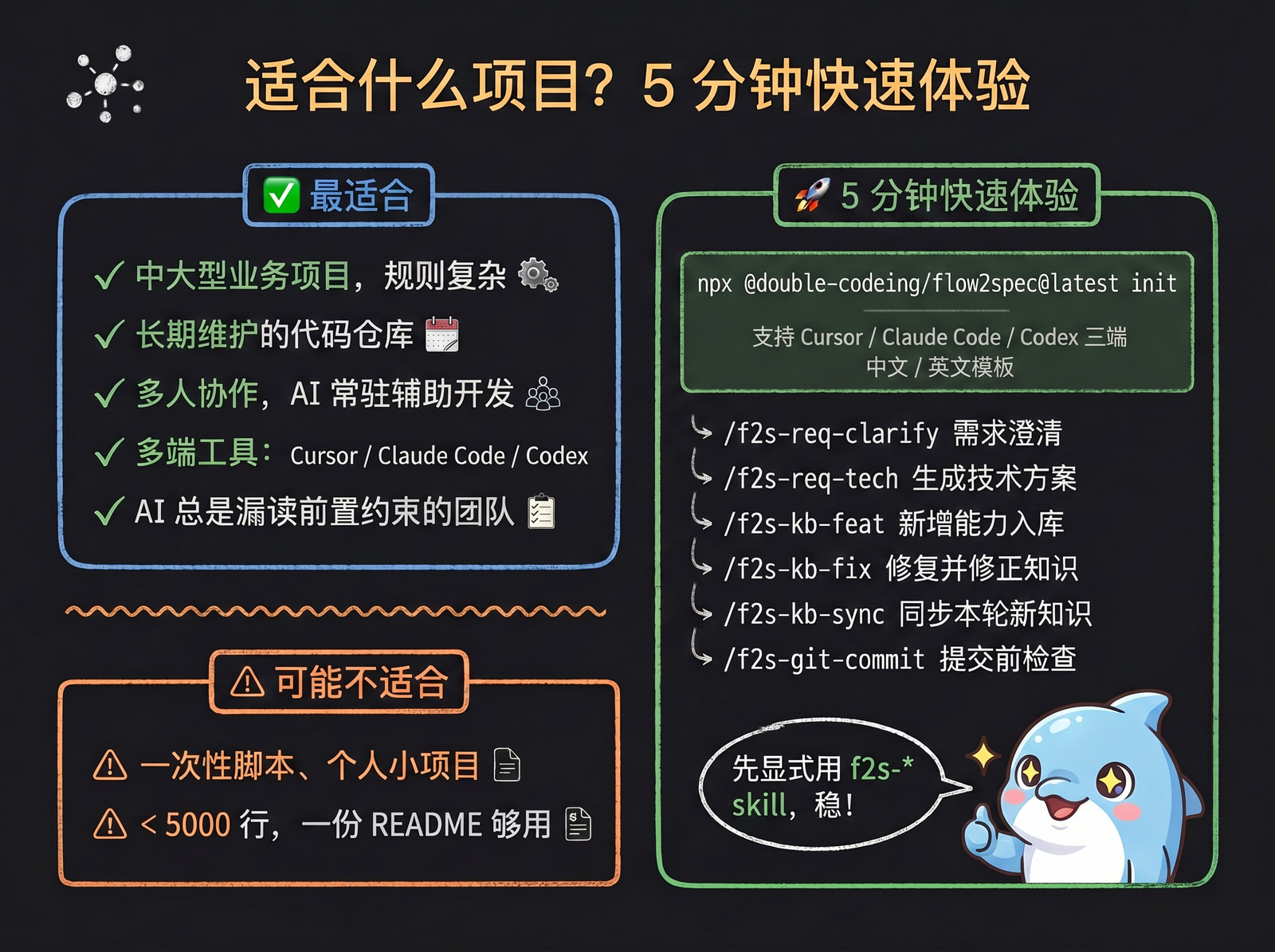
Best for: medium to large business projects, long-lived codebases, multi-person teams with many rules, teams using multiple AI coding clients, and projects where you want AI to participate in maintaining project knowledge — not just read docs.
May not fit: one-off scripts or very small personal projects (< 5000 lines, a README is enough).
5-minute quick start:
npm install -g @double-coding/flow2spec
flow2spec init
When getting started, we recommend typing f2s-* skills explicitly first to get familiar with them — it’s the most efficient way to learn Flow2Spec. Enabling intentRecognition by default then lets the Agent route common tasks automatically.
Common workflows:
/f2s-req-clarify   Requirements clarification
/f2s-req-tech      Generate technical design
/f2s-kb-feat       Add capability and sync knowledge
/f2s-kb-fix        Fix issue and correct knowledge
/f2s-kb-add <path> Parse an existing module into the knowledge base
/f2s-kb-sync       Global / batch sync of shipped capabilities into the KB
/f2s-kb-distill    Extract this round's Q&A into the KB (auto-decides new topic or supplement)
/f2s-git-commit    Pre-commit check and generate commit message
Initialization is client-selectable and supports both Chinese and English templates; new clients can reuse the same knowledge-base and skill-distribution model.
Closing
AI coding is not only about generating code. In long-lived projects, the harder part is helping the agent read the right context and sync newly confirmed facts back into the project knowledge base.
Flow2Spec organizes project knowledge into routable, dependency-aware, verifiable topics and matchers. The agent reads the relevant facts before handling a request; when those facts change, the matching skills update the knowledge base.
If your project already has these problems, try it in one repository first:
- the same business rules need to be explained to the agent again and again;
- the agent often misses prerequisite constraints;
- documentation and code have started to drift apart.
npm install -g @double-coding/flow2spec
flow2spec init
Repository: https://github.com/double-coding-lab/Flow2Spec
Live demo: https://double-coding-lab.github.io/Flow2Spec